
DTF Gang Sheet Size Guide: How Long Should Your Sheet Be?
A DTF gang sheet is the most cost-effective way to print many designs at once, but the first question almost everyone asks is the same: how long should my sheet be? Order too short and your designs will not fit. Order too long and you pay for film you do not use. This guide explains what a gang sheet is, how the 22" width works, how to choose the right length, and whether you should upload a finished file or use our online builder.
What is a DTF gang sheet?
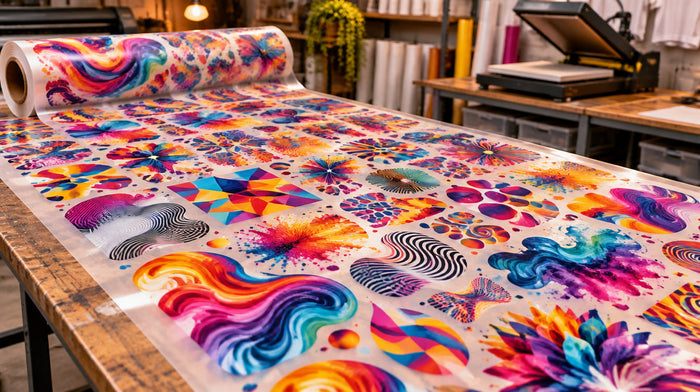
A gang sheet packs many designs onto one large sheet of DTF film instead of printing each design on its own. You pay for the sheet, not per design, so filling the space well is how you get the best value. It is a popular choice for small brands, teams, events and anyone printing several logos, sizes or designs in one order.
Each design on the sheet is printed in full color with a white underbase, then coated with adhesive. After you receive the sheet you cut the designs apart and heat press them onto your garments.
Every sheet is 22" wide
All of our DTF gang sheets are 22 inches wide. The only thing you choose is the length. That makes planning simple: think of the sheet as a 22" wide strip, and work out how much length your designs need.
- Upload your gang sheet: lengths from 24" to 240" (22"×24", 22"×60", 22"×84", 22"×120", 22"×180" and 22"×240").
- Online gang sheet builder: the same lengths, plus a 22"×360" sheet for big orders.
Longer sheets cost less per inch, so if you are close to the next size up, it is often worth going longer and adding a few extra designs.
How many designs fit? Two simple examples
The exact number depends on your designs and how tightly they are packed, but you can estimate it with simple math. Our online builder's Auto Nest leaves a 0.125" gap between images, so in the examples below each design takes up its own size plus about 1/8".
Example 1: Left-chest logos (4"×4")
A 4"×4" left-chest logo takes about 4.125" of space with the gap. Across the 22" width, five logos fit side by side (5 × 4.125" = 20.6"). Down a 24" length, five rows fit (5 × 4.125" = 20.6"). That gives roughly 25 left-chest logos on a 22"×24" sheet, which makes the smallest sheet a good choice for a test run or a few dozen small logos.
Example 2: Full-front prints (12"×14")
A 12"×14" full-front design is wider than half the sheet, so only one fits across the 22" width. Each one uses about 14.125" of length. On a 22"×120" sheet that is about 8 full-front prints (8 × 14.125" = 113"). The space next to each full-front print (about 9.9" wide) is not wasted: it is wide enough for two columns of 4"×4" logos, so you can fill it with left-chest logos, sleeve prints or neck labels.
These are estimates to help you plan. The easiest way to see exactly what fits is to lay your designs out in the builder before you order.
How to choose the right length
- List your designs and sizes. Write down each design, the print size you want and how many of each you need.
- Group by width. Small designs (4" or 5") can sit several across. Large designs (11" or 12" wide) take most of the width and stack down the sheet.
- Add up the length. For each row, use the height of the tallest design in that row plus a small gap, and add the rows together.
- Round up to the next sheet size, then fill any leftover space with extra copies or small designs. You are paying for the whole sheet, so use it.
As a rough guide: a 22"×24" sheet suits test runs and a few logos, 60" to 84" suits small batches and mixed designs, 120" is popular for small brands, and 180" to 240" (or 360" in the builder) is for larger orders where the price per inch is lowest.
Upload a finished file or use the builder?
Upload your gang sheet
Choose Upload Your Gang Sheet if you already have a print-ready file laid out at 22" wide. We print it exactly as you send it. Send a PNG with a transparent background at 300 DPI, saved at the exact size you want printed. Vector files (AI, EPS, PDF, SVG) work perfectly too.
Build your gang sheet online
Choose the Gang Sheet Builder if you have separate designs and no layout software. The builder works in your browser and accepts PNG, JPG, WEBP, SVG, PSD, PDF, AI and EPS files. Useful tools include:
- Auto Build to place many images on the sheet at once.
- Auto Nest to pack designs tightly and use less film, with a 0.125" gap between images.
- Print quality check: a green line around an image means it is 300 DPI or better and will print sharp.
- Add text for names, numbers or a slogan, and duplicate a design as many times as you need.
File tips for a sharp gang sheet
- Use artwork at 300 DPI at the size you want printed.
- Use a transparent background, so you do not end up with a box around your design.
- Avoid low-resolution JPG images saved from social media. They print blurry or pixelated.
- Keep your designs inside the 22" width.
Order your DTF gang sheet in NYC
We print every gang sheet as full-color, ready-to-press DTF transfers at our Garment District shop in Manhattan. There is no minimum order, so you can start with one sheet. Orders placed before 12 PM ET on business days go into production the same day, with free pickup at 146 W 29th St or shipping across the US.
Have a finished file? Upload your gang sheet. Have separate designs? Build your gang sheet online.